# iterm2的安装与常用功能
# 一、安装
官网地址https://iterm2.com/ (opens new window)
# 二、oh-my-zsh安装
官网地址https://ohmyz.sh/#install (opens new window)
# 三、主题配置
这个不重要、用系统的就好了。
# 四、插件
1、 autojump 自动跳转 2、 zsh-syntax-highlighting 高亮 3、 zsh-autosuggestions 自动提示
# 五、常用功能
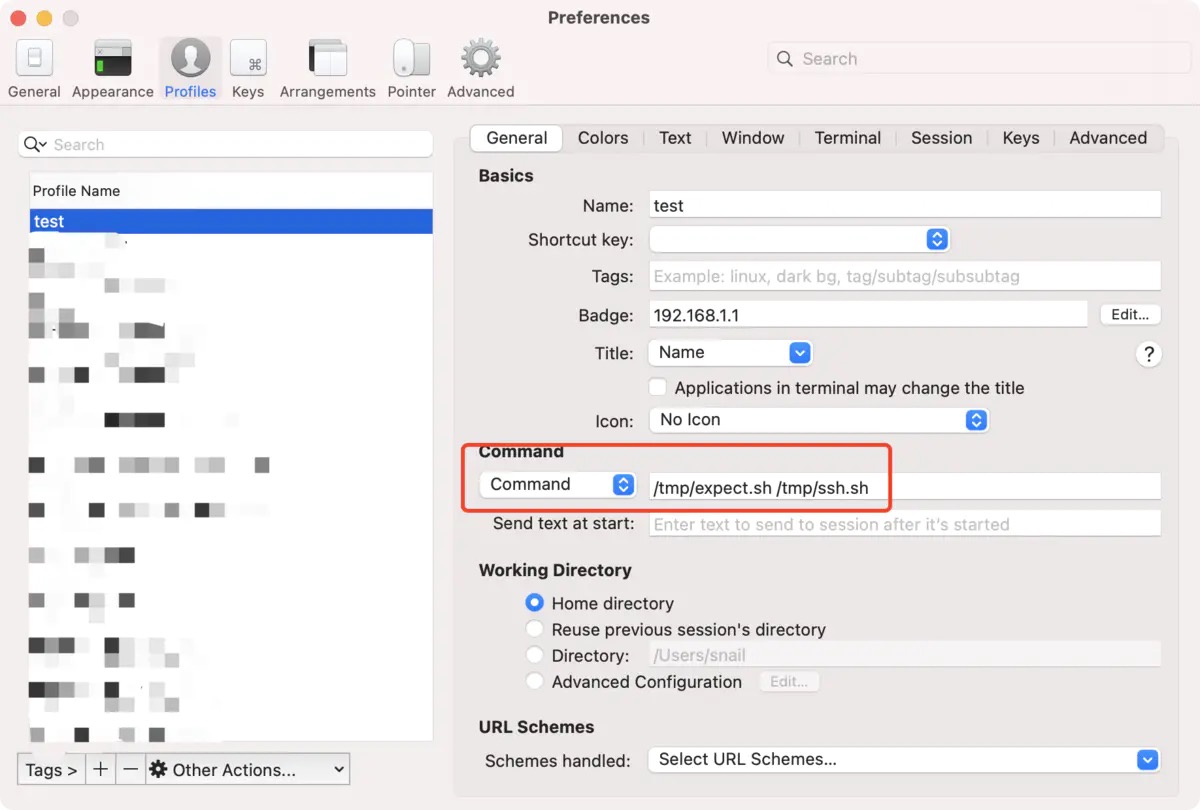
# 快速打开服务器(expect无法上传问题)
配置expoect权限脚本
vi /tmp/expect.sh

# 脚本内容如下
#!/bin/sh
export LC_CTYPE=en_US
#expect脚本所在位置
filepath=$1
if [ -f $filepath ]; then
    expect $filepath
fi

# 修改文件可执行权限
chmod -R 755 /tmp/expect.sh
远程服务器expect脚本
vi /tmp/ssh.sh

# 脚本内容如下
#!/usr/bin/expect
set user root
set host 192.168.1.1
set password root@123

spawn ssh -A $user@$host
expect "*assword:*"
send "$password\r"

interact
expect eof
# 上传文件
官方介绍:https://www.ohse.de/uwe/software/lrzsz.html
# 安装lrzsz
brew install lrzsz
# 此时iterm2还不能使用rz、sz命令,必须安装两个脚本
cd /usr/local/bin
wget https://raw.githubusercontent.com/RobberPhex/iterm2-zmodem/master/iterm2-recv-zmodem.sh
wget https://raw.githubusercontent.com/RobberPhex/iterm2-zmodem/master/iterm2-send-zmodem.sh

# 赋予这两个文件可执行权限
chmod 755 /usr/local/bin/iterm2-*
iterm2-send-zmodem.sh
#!/bin/bash
# Author: Matt Mastracci (matthew@mastracci.com)
# AppleScript from http://stackoverflow.com/questions/4309087/cancel-button-on-osascript-in-a-bash-script
# licensed under cc-wiki with attribution required
# Remainder of script public domain

osascript -e 'tell application "iTerm2" to version' > /dev/null 2>&1 && NAME=iTerm2 || NAME=iTerm
if [[ $NAME = "iTerm" ]]; then
    FILE=`osascript -e 'tell application "iTerm" to activate' -e 'tell application "iTerm" to set thefile to choose file with prompt "Choose a file to send"' -e "do shell script (\"echo \"&(quoted form of POSIX path of thefile as Unicode text)&\"\")"`
else
    FILE=`osascript -e 'tell application "iTerm2" to activate' -e 'tell application "iTerm2" to set thefile to choose file with prompt "Choose a file to send"' -e "do shell script (\"echo \"&(quoted form of POSIX path of thefile as Unicode text)&\"\")"`
fi
if [[ $FILE = "" ]]; then
    echo Cancelled.
    # Send ZModem cancel
    echo -e \\x18\\x18\\x18\\x18\\x18
    sleep 1
    echo
    echo \# Cancelled transfer
else
    /usr/local/bin/sz "$FILE" -e -b
    sleep 1
    echo
    echo \# Received $FILE
fi
iterm2-recv-zmodem.sh
#!/bin/bash
# Author: Matt Mastracci (matthew@mastracci.com)
# AppleScript from http://stackoverflow.com/questions/4309087/cancel-button-on-osascript-in-a-bash-script
# licensed under cc-wiki with attribution required
# Remainder of script public domain

osascript -e 'tell application "iTerm2" to version' > /dev/null 2>&1 && NAME=iTerm2 || NAME=iTerm
if [[ $NAME = "iTerm" ]]; then
    FILE=`osascript -e 'tell application "iTerm" to activate' -e 'tell application "iTerm" to set thefile to choose folder with prompt "Choose a folder to place received files in"' -e "do shell script (\"echo \"&(quoted form of POSIX path of thefile as Unicode text)&\"\")"`
else
    FILE=`osascript -e 'tell application "iTerm2" to activate' -e 'tell application "iTerm2" to set thefile to choose folder with prompt "Choose a folder to place received files in"' -e "do shell script (\"echo \"&(quoted form of POSIX path of thefile as Unicode text)&\"\")"`
fi

if [[ $FILE = "" ]]; then
    echo Cancelled.
    # Send ZModem cancel
    echo -e \\x18\\x18\\x18\\x18\\x18
    sleep 1
    echo
    echo \# Cancelled transfer
else
    cd "$FILE"
    /usr/local/bin/rz -E -e -b
    sleep 1
    echo
    echo
    echo \# Sent \-\> $FILE
fi
macOs中iterm2使用expect远程lrzsz无法使用解决方案 (opens new window)
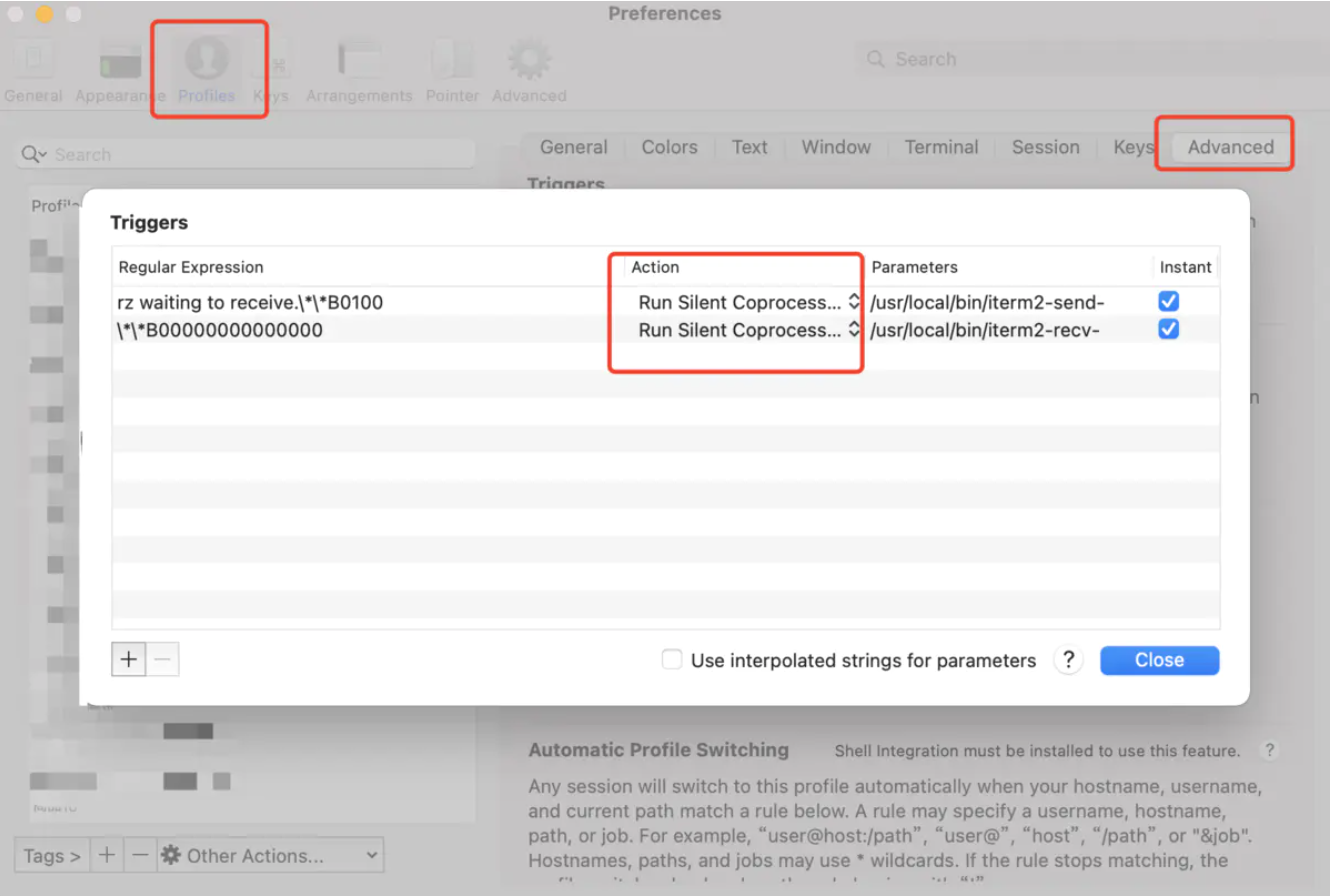
# 设置 Iterm2 的 Tirgger 特性
# 拷贝以下键值复制进去即可
rz waiting to receive.\*\*B0100
\*\*B00000000000000
/usr/local/bin/iterm2-send-zmodem.sh
/usr/local/bin/iterm2-recv-zmodem.sh